

Every month, an electricity bill arrives. You look at the total, wince a little, and then move on with your life because there’s really nothing else to do. You don’t know which appliances are costing the most. You don’t know if something is running when it shouldn’t be. You just know the number went up again, and you’re not sure why.
Here’s the thing: you’ve been paying for electricity for years without ever actually seeing it. You see the bill the final score but nothing about what happened during the game.
An energy monitor changes that. It clamps onto your electrical panel and starts telling you, in real time, exactly what’s consuming power and what it’s costing you. That chest freezer in the garage that you keep meaning to replace? It’ll show up. The old TV in the guest room that runs on standby all the time? Also there. Your HVAC system quietly working overtime on a hot afternoon? All visible, all accounted for.
You’ve probably wondered where your electricity bill actually goes. A smart home energy monitor clamps onto your electrical panel and tells you, in real time, exactly what’s consuming power and what it’s costing you. This guide explains how they work, what the main options are, and whether it’s worth getting one.
What Is a Home Energy Monitor?
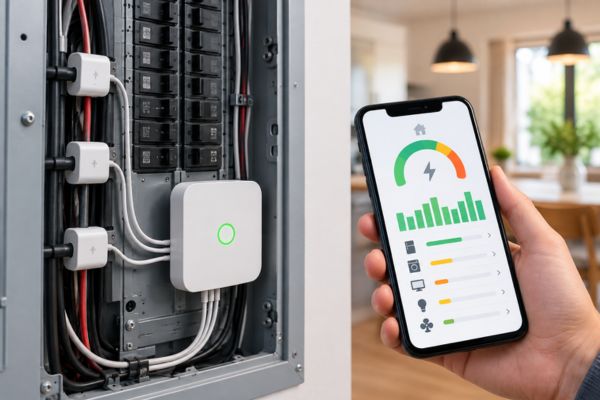
A home energy monitor is a device that tracks your home’s electricity use. Not in the vague way your utility bill does, but specifically and in real time appliance by appliance, circuit by circuit, dollar by dollar.
The hardware part is a set of sensors that clip around the wires in your electrical panel. They don’t interfere with your wiring, they just sense the electrical current passing through. From that data, the device builds a picture of what’s running in your home at any given moment.
Then there’s an app on your phone that shows you all of it. Current consumption right now. Which devices are on. How much they’ve cost so far this month. Whether something unusual is happening that you’d want to know about.
It’s a bit like putting a fitness tracker on your house. Your house has been running along doing its thing for years, and you’ve never really known what was going on inside. The monitor just makes it visible.
What You Actually Learn From One
This is where it gets interesting. Most people who install an energy monitor discover at least one thing that genuinely surprises them. Usually something that’s been quietly costing them money for years.
Common discoveries include a refrigerator drawing significantly more power than expected, a sump pump cycling too often, or a garage freezer running constantly because the door seal failed. These kinds of things never show up on your utility bill as a separate line item. They just inflate the total silently, month after month.
The garage chest freezer is practically a cliché at this point because it comes up so often. People inherit them, or buy them for extra storage, and then forget they exist until an energy monitor politely informs them that the freezer from 2003 is costing more to run per year than a newer full-size fridge would cost to buy.
Beyond the surprises, you also start to see your normal usage patterns in a new way. Your HVAC is probably your biggest energy consumer, but you might not realize how much it ramps up during certain hours or how a few degrees of thermostat adjustment would affect the bill. You see which evenings the house uses more power than others, and usually figure out why pretty quickly.
Once you can see those numbers in dollars per month, the savings almost arrange themselves.
The Two Main Types
There are two approaches to home energy monitoring, and they suit different kinds of people.
The Whole Home Monitor (The Smart Detective)
This type installs in your electrical panel and monitors your entire home’s power use at once. The Sense Energy Monitor is the main example here. It uses machine learning to detect individual appliances by their electrical “signatures” every device has a slightly different pattern when it starts up and runs, and Sense learns to recognize them.
The app is polished and genuinely enjoyable to use. You watch it in the first few weeks as it starts naming things in your home. There’s something almost exciting about it like your house is gradually introducing itself to you.
The patience requirement is real though. Sense gets smarter over time, but it can be a little frustrating in the first weeks when it’s still figuring things out.
The Circuit Level Monitor (The Detailed Spreadsheet)
The Emporia Vue takes a different approach. Instead of guessing which appliance is which, you tell it directly by placing sensors on individual circuits in your panel. Label the HVAC circuit, the water heater, the EV charger, the kitchen outlets and from that point on you see exactly what each one is doing.
This approach gives you more granular and more reliable data right from the start. The tradeoff is that installation is a bit more involved, and you need to know (or figure out) which breaker corresponds to which part of your home.
On average, customers with an Emporia Vue save around 10% on their monthly electricity bills. The Emporia is also the more affordable option and has no subscription fee, which over a few years makes a meaningful difference.
Which One Is Right for You?
If you want a relatively hands-off experience that works its magic in the background and gradually reveals your home’s habits, Sense is the more satisfying device to live with. It feels like a smart assistant learning about your house.
If you want precise, reliable data from day one and don’t mind a slightly more involved setup, Emporia Vue gives you more control and costs less to run long term.
Both are genuinely useful. Neither is the wrong choice they just suit different people.
Do You Actually Need One?

Honestly, not everyone does. And there’s no shame in admitting that.
If you already have a smart thermostat, smart plugs on your main energy hogs, and a general sense of where your power is going, you might not need a whole panel monitor on top of that. The smart plugs are already doing targeted monitoring where it counts most.
But if you look at your electricity bill every month with genuine confusion about where the money is going, an energy monitor is probably the most direct solution you can buy. It doesn’t require any behavior change upfront — you just install it and watch what it tells you. The behavior change comes naturally once you can see the data.
It’s also worth considering if you’re planning any energy upgrades. Thinking about replacing the old fridge, adding solar panels, or installing an EV charger? An energy monitor gives you before and after data that makes it much easier to measure the real impact of those decisions.
A Note on Installation
This is the part where some people get a little nervous, and understandably so. The sensors go inside your electrical panel, which is the thing most homeowners are told to never touch.
The honest answer is that installation is not complicated, but it does involve being careful around live electrical components. The Emporia Vue can be completed in 30 to 60 minutes with basic electrical knowledge. Both Sense and Emporia have detailed installation guides, and their support teams are responsive if you get stuck.
If you’re not comfortable inside your electrical panel, hiring an electrician to install it is completely reasonable and usually doesn’t take more than an hour of their time. It’s a one-time cost that gets you years of useful data in return.
Neither device requires rewiring anything. The sensors clip around the wires; they don’t connect to them. You’re measuring current, not rerouting it.
What the Numbers Actually Look Like
Here’s a typical example of what someone discovers in the first month of having an energy monitor:
Their HVAC is responsible for roughly half their electricity use which they expected. Their water heater is using more than they thought less expected. Their garage freezer is the third highest consumer in the home definitely not expected, and they hadn’t opened it in two weeks.
That last one is the energy monitor earning its entire purchase price in a single discovery. An old inefficient freezer running 24 hours a day for a household that barely uses it is exactly the kind of invisible cost that lives in utility bills for years before anyone notices.
Frequently Asked Questions
Not necessarily, but it’s a reasonable choice if you’re not comfortable working around your electrical panel. The sensors clip around wires rather than connecting to them, so no rewiring is involved. Most people with basic DIY confidence manage it in under an hour. If you’d rather have a professional do it, that’s a perfectly sensible call too.
Yes, both Sense and Emporia Vue support solar monitoring. They can track both the power you draw from the grid and the power your solar panels generate, giving you a complete picture of what you’re producing versus consuming. This is particularly useful for understanding your actual solar savings rather than relying on estimates.
Not directly. The monitor shows you where the power is going; what you do with that information is up to you. Most people find that seeing the data naturally leads to changes adjusting thermostat settings, replacing an old appliance, or putting a smart plug on the entertainment center. The awareness does the work, not the device itself.
Both Sense and Emporia collect data through their cloud platforms, which is how the apps work. The Emporia Vue does offer local data storage options that reduce cloud dependency, which is worth knowing if privacy is a priority for you. Sense relies more heavily on cloud processing for its machine learning features. Check each company’s privacy policy before purchasing if this matters to you.
With Emporia Vue, you start seeing circuit-level data immediately after installation because you’ve labeled the circuits yourself. With Sense, the real-time total usage data is instant, but appliance-level identification takes four to eight weeks as the machine learning builds up a picture of your home. Most users find both approaches useful right away, just for slightly different reasons.
The Bottom Line
An energy monitor won’t magically shrink your electricity bill. Nothing does that without some kind of change in behavior or equipment.
What it does is remove the mystery. Instead of paying a bill and moving on, you actually know what you’re paying for. You know which appliances are the biggest spenders. You know when your usage spikes and why. You know when something is running that shouldn’t be.
For most people, that knowledge leads naturally to small changes that save real money over time. Not dramatic changes, just the kind that come from finally being able to see what was invisible before.
If your electricity bill has felt like a guessing game lately, an energy monitor is probably the most direct cure. The house has been keeping secrets from you. It’s time to find out what they are.
Ecobee Smart Thermostat Premium Review: The Best Smart Thermostat for Most US Homes?

Let’s be honest. A thermostat isn’t exactly the most exciting thing you’re going to buy for your home. It’s not…
Energy Monitoring Devices Explained: Finally Know Where Your Money Is Going
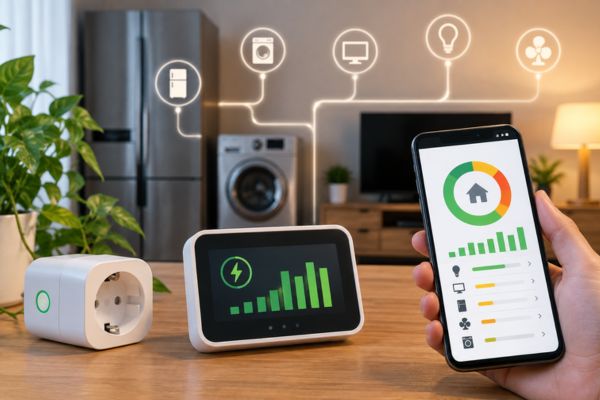
Every month, an electricity bill arrives. You look at the total, wince a little, and then move on with your…
Smart Plugs: The Simple Energy Saver Most Homeowners Overlook
There’s a good chance something in your living room is costing you money right now. Not because it’s running because…
How Smart Thermostats Save Money: The Real Numbers (And When They Don’t)
Every smart thermostat review says the same thing: install one and save money. The claims range from $50 a year…
The Future of Matter in Smart Homes: New Connectivity Standard

Discover how Matter is shaping the future of smart homes with seamless connectivity, cross-brand compatibility, and simpler device control.