
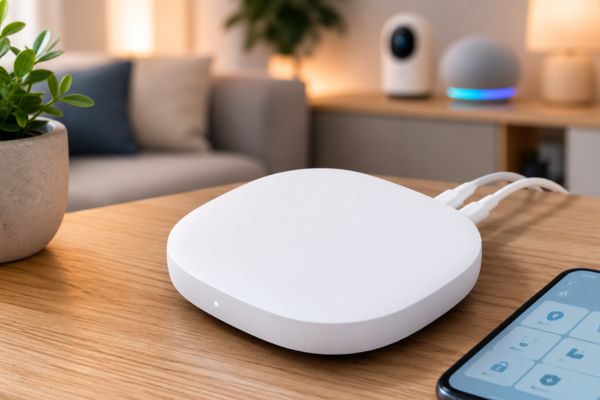

SmartThings Hub: Is It Still the Best Smart Home Hub?
Disclosure: Some links here are affiliate links. We may earn a commission at no extra cost to you. As an Amazon Associate, AutomateVerge earns from qualifying purchases. Read our affiliate disclosure.
Smart home hub devices have become more capable than ever, but managing products from different brands can quickly become frustrating. That’s where Samsung’s SmartThings ecosystem comes in. In this SmartThings Hub, we’ll explore whether Samsung’s flagship hub remains one of the best options for building a reliable, flexible, and future-proof smart home.
Whether you’re just starting or already own dozens of smart devices, this covers everything you need to know.
What Is the SmartThings Hub?
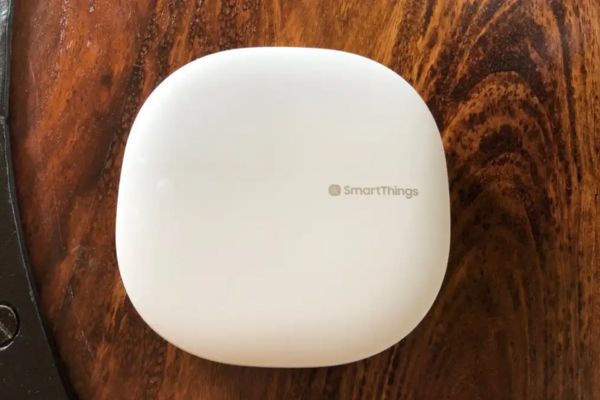
The SmartThings Hub is Samsung’s central smart home controller that connects compatible devices using multiple wireless protocols including:
- Zigbee
- Z-Wave
- Matter
- Thread
- Wi-Fi
- Ethernet
Instead of relying on numerous manufacturer apps, the SmartThings Hub allows users to manage everything inside a single SmartThings app.
Its biggest advantage is broad compatibility across thousands of smart home products.
Design and Build Quality
Samsung keeps the design simple.
The SmartThings Hub features:
- Compact square design
- Minimal white finish
- LED status indicator
- Ethernet port
- Power input
Because it operates quietly without fans, it’s easy to place on a shelf, desk, or entertainment center.
Setup Process
One of the strongest aspects of this SmartThings Hub is the setup experience.
Installation typically takes less than 10 minutes.
Steps include:
- Connect power.
- Connect Ethernet (or Wi-Fi for supported versions).
- Download the SmartThings app.
- Sign in with a Samsung account.
- Scan the QR code.
- Begin adding devices.
The app guides users through every step.
Device Compatibility
Compatibility is where SmartThings shines.
Supported categories include:
- Smart lights
- Motion sensors
- Door sensors
- Locks
- Thermostats
- Smart plugs
- Cameras
- Smoke detectors
- Garage door controllers
- Blinds
- Water leak sensors
Popular brands include:
- Philips Hue
- Yale
- Aqara
- Ring
- TP-Link
- Ecobee
- Sonos
- IKEA
- Nanoleaf
- GE Cync
Matter support also continues to improve compatibility with newer devices.
Automation Features
Automation is one of the primary reasons people purchase a smart hub.
SmartThings supports:
- Time-based routines
- Location automation
- Sunrise and sunset triggers
- Motion detection
- Door sensor triggers
- Temperature automation
- Multi-device scenes
For example:
When you arrive home:
- Unlock the door
- Turn on hallway lights
- Start air conditioning
- Play music
Everything happens automatically.
Performance
During daily use, the SmartThings Hub performs reliably.
Advantages include:
- Fast command execution
- Stable Zigbee network
- Reliable Z-Wave communication
- Good Matter implementation
- Local automation support
Most automations execute within a second.
Local processing also means many routines continue working even if the internet connection temporarily fails.
SmartThings App Experience
The SmartThings app has improved dramatically over recent years.
Users can:
- Monitor devices
- Create automations
- View energy usage
- Receive alerts
- Share device access
- Organize rooms
- Build custom scenes
The interface is clean enough for beginners while offering advanced automation for enthusiasts.
Voice Assistant Integration
The hub works well with:
- Amazon Alexa
- Google Assistant
- Samsung Bixby
This allows users to control devices with voice commands regardless of device manufacturer.
Security Features
Samsung includes several security benefits:
- Secure cloud accounts
- Two-factor authentication
- Local automation processing
- Remote monitoring
- Device permission management
While cloud services remain part of the ecosystem, sensitive automation can often run locally.
Pros
- Excellent multi-protocol support
- Easy setup
- Broad device compatibility
- Strong automation engine
- Matter ready
- Local automation support
- Clean mobile app
Cons
- Samsung account required
- Some advanced automations require learning
- Cloud dependency for certain features
- Some third-party integrations occasionally change
Who Should Buy the SmartThings Hub?
This hub is ideal for:
- Beginners building a smart home
- Homeowners using devices from multiple brands
- Users wanting Matter compatibility
- Families sharing smart home access
- Automation enthusiasts
It may not be the best choice if you only use Wi-Fi smart plugs and lights that already function well without a hub.
SmartThings Hub vs Competitors
| Feature | SmartThings Hub | Home Assistant | Hubitat |
|---|---|---|---|
| Beginner Friendly | ⭐⭐⭐⭐⭐ | ⭐⭐ | ⭐⭐⭐ |
| Matter Support | Excellent | Excellent | Good |
| Zigbee | Yes | Yes | Yes |
| Z-Wave | Yes | Yes | Yes |
| Local Automation | Yes | Yes | Yes |
| Mobile App | Excellent | Moderate | Basic |
SmartThings strikes an excellent balance between simplicity and advanced functionality.
Pricing and Value
Although pricing varies by retailer and region, the SmartThings Hub remains competitively priced considering:
- Multi-protocol support
- Frequent software updates
- Large ecosystem
- Reliable automation
- Future-ready Matter support
For most users, it offers excellent long-term value.
Final Verdict
After completing this SmartThings Hub, it’s clear that Samsung still offers one of the strongest smart home hubs available today.
Its combination of extensive compatibility, reliable automation, Matter support, and beginner-friendly setup makes it suitable for nearly every smart home.
While advanced users may eventually explore platforms like Home Assistant, SmartThings remains one of the easiest ways to build a powerful connected home without unnecessary complexity.