
Which Streaming Device is Right For You?
Disclosure: Some links here are affiliate links. We may earn a commission at no extra cost to you. As an Amazon Associate, AutomateVerge earns from qualifying purchases. Read our affiliate disclosure.
Streaming devices have become one of the easiest ways to upgrade any television into a smart entertainment hub. Whether you want to watch Netflix, YouTube, Disney+, or live TV, a dedicated streaming device often delivers a smoother and faster experience than many built in smart TV platforms example Roku vs Fire Stick vs Chromecast.
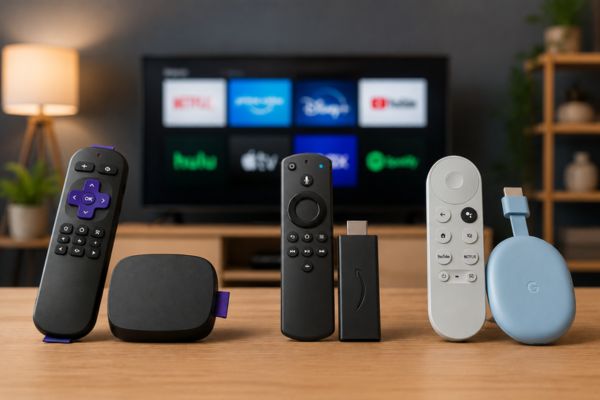
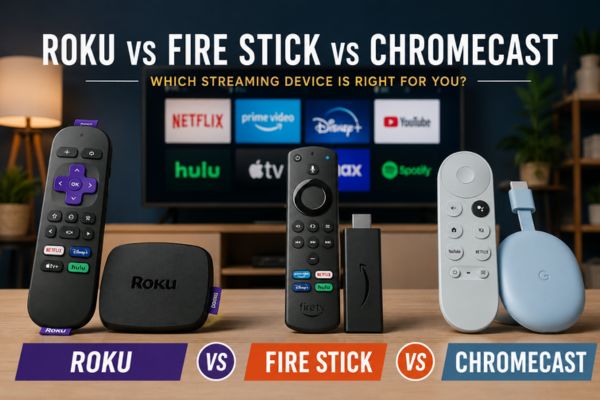
Three of the most popular options are Roku, Amazon Fire Stick, and Google Chromecast. Each offers access to thousands of apps, supports high-definition streaming, and includes unique features designed for different types of users.
This guide compares Roku vs Fire Stick vs Chromecast, covering performance, interface, content availability, voice assistants, pricing, and more to help you choose the right streaming device.
What Is a Streaming Device?
A streaming device connects to your TV through an HDMI port and gives you access to online streaming services using your home internet connection.
Most modern streaming devices support:
- Netflix
- YouTube
- Disney+
- Prime Video
- Apple TV+
- Hulu
- Max
- Spotify
- Twitch
- Plex
- Live TV services
Many devices also support voice control, screen mirroring, gaming, and smart home integration.
Roku
Roku focuses on simplicity. Its interface is clean, fast, and easy to understand, making it popular among beginners and families.
Pros
- Extremely simple interface
- Supports almost every major streaming service
- Neutral platform without favoring one content provider
- Affordable devices
- Reliable performance
Cons
- Fewer smart home features
- Voice assistant is less advanced
- Interface looks basic compared to competitors
Roku is ideal for users who simply want easy access to streaming apps without extra complexity.
Amazon Fire Stick
Amazon Fire Stick is built around the Amazon ecosystem and integrates deeply with Alexa.
Its interface highlights Amazon Prime Video content while also supporting nearly every major streaming service.
Pros
- Excellent Alexa integration
- Large app library
- Fast performance
- Supports cloud gaming on some models
- Frequent discounts
Cons
- Home screen promotes Amazon content
- Interface may feel cluttered
- Amazon ads appear throughout the UI
Fire Stick works best for Prime members and Alexa users.
Google Chromecast
Modern Chromecast devices run Google TV instead of relying only on casting.
Google TV combines streaming apps with personalized recommendations powered by Google.
Pros
- Clean Google TV interface
- Powerful Google Assistant
- Excellent recommendations
- Built-in Chromecast casting
- Strong smart home integration
Cons
- Less customizable than Android TV
- Some storage limitations
- Premium models cost more
Chromecast is an excellent choice for Android users and people invested in Google’s ecosystem.
Roku vs Fire Stick vs Chromecast Comparison
| Feature | Roku | Fire Stick | Chromecast |
|---|---|---|---|
| Ease of Use | Excellent | Good | Excellent |
| Interface | Simple | Feature-rich | Modern |
| Voice Assistant | Roku Voice | Alexa | Google Assistant |
| App Library | Excellent | Excellent | Excellent |
| Smart Home | Basic | Alexa Ecosystem | Google Home |
| Screen Casting | Good | Limited | Excellent |
| Personalized Recommendations | Basic | Good | Excellent |
| Gaming Support | Limited | Better | Moderate |
| Best For | Beginners | Prime Users | Android Users |
User Interface
Roku
Roku has one of the simplest interfaces available.
The home screen displays installed apps in a straightforward grid without unnecessary distractions.
Navigation is intuitive, making it suitable for all age groups.
Fire Stick
Fire Stick features a content-first interface.
Recommendations, advertisements, and Prime Video suggestions appear throughout the home screen.
Although visually appealing, some users may find it busy.
Chromecast
Google TV delivers a modern interface focused on personalized recommendations.
Content from multiple streaming services appears together, helping users discover new movies and TV shows without opening individual apps.
Performance
Performance depends on the specific model, but flagship versions from all three brands deliver smooth streaming.
General performance comparison:
- Roku Ultra performs exceptionally well
- Fire TV Stick 4K Max is very fast
- Chromecast with Google TV offers responsive navigation
For everyday streaming, all three platforms provide reliable performance.
Streaming Quality
Modern versions of each device support:
- 4K Ultra HD
- HDR10
- HDR10+
- Dolby Vision (selected models)
- Dolby Atmos (selected models)
To enjoy these formats, your TV and streaming service must also support them.
App Availability
All three platforms include most popular streaming services.
Common apps include:
- Netflix
- Disney+
- Hulu
- Prime Video
- Apple TV+
- YouTube
- Spotify
- Max
- Paramount+
- Peacock
- Plex
Most users will not notice significant differences in app availability.
Voice Control
Roku Voice
Roku Voice supports:
- Launching apps
- Searching movies
- Basic playback controls
It works well but remains relatively simple.
Alexa
Fire Stick includes Alexa integration.
Users can:
- Control smart home devices
- Ask questions
- Set timers
- Search content
- Control compatible TVs
Alexa provides one of the most complete voice experiences.
Google Assistant
Chromecast includes Google Assistant.
It supports:
- Smart home control
- Natural language searches
- Calendar information
- Weather updates
- Voice-controlled playback
Google Assistant generally offers excellent search accuracy.
Smart Home Integration
Roku
Roku supports basic smart home products but has the smallest ecosystem.
Fire Stick
Amazon’s platform integrates seamlessly with:
- Echo speakers
- Ring cameras
- Smart lights
- Smart plugs
- Security systems
Chromecast
Google TV works perfectly with:
- Google Nest speakers
- Nest cameras
- Smart thermostats
- Google Home automation
- Android phones
Screen Casting
Screen casting differs significantly.
Roku
Supports casting from many mobile devices.
Fire Stick
Casting is available but less seamless than Chromecast.
Chromecast
Chromecast remains the industry leader for wireless casting.
Users can cast:
- YouTube
- Chrome browser tabs
- Photos
- Videos
- Music
- Android screens
The experience is fast and highly reliable.
Remote Control
All three devices include compact remotes with voice search.
Typical features include:
- Volume controls
- TV power button
- Voice button
- Streaming app shortcuts
Premium Roku and Fire Stick remotes may also include customizable shortcut buttons.
Gaming Features
None of these devices replace a gaming console, but they offer casual gaming.
Roku
- Simple games
- Limited selection
Fire Stick
- Amazon Luna cloud gaming support
- Bluetooth controller compatibility
- Better gaming performance
Chromecast
- Android games
- Cloud gaming services (availability varies)
Fire Stick is generally the strongest option for casual gamers.
Pricing
Pricing varies by model.
Typical categories include:
| Device | Entry Level | Mid Range | Premium |
|---|---|---|---|
| Roku | Budget friendly | Mid range | Roku Ultra |
| Fire Stick | Affordable | 4K Models | 4K Max |
| Chromecast | Mid-range | Google TV | Premium Google TV Devices |
Amazon frequently discounts Fire Stick devices during major sales events.
Which Streaming Device Should You Choose?
Choose Roku if you:
- Want the simplest interface
- Prefer easy setup
- Need reliable streaming
- Do not require advanced smart home features
Fire Stick is the better choice if you:
- Already subscribe to Prime Video
- Use Alexa devices
- Want smart home integration
- Enjoy occasional cloud gaming
Chromecast is ideal if you:
- Use Android phones
- Prefer Google Assistant
- Frequently cast content
- Want personalized recommendations
Pros and Cons
Roku
Pros
- Easy to use
- Clean interface
- Excellent app support
- Affordable
Cons
- Basic smart home features
- Fewer advanced options
Fire Stick
Pros
- Fast hardware
- Alexa integration
- Frequent discounts
- Great smart home support
Cons
- Busy interface
- Amazon-focused recommendations
Chromecast
Pros
- Excellent casting
- Google Assistant
- Smart recommendations
- Modern interface
Cons
- Limited storage
- Slightly higher price on some models
Frequently Asked Questions
Which streaming device is easiest to use?
Roku offers the simplest interface and is ideal for beginners and families.
Is Fire Stick better than Chromecast?
Fire Stick is better for Amazon users, while Chromecast is a stronger choice for Android users and those who frequently cast content.
Does Roku support 4K?
Yes. Several Roku models support 4K, HDR, Dolby Vision, and Dolby Atmos.
Which device has the best voice assistant?
Google Assistant and Alexa provide more advanced voice features than Roku Voice.
Can I watch Netflix on all three devices?
Yes. Roku, Fire Stick, and Chromecast all support Netflix and most major streaming platforms.
Final Verdict
When comparing Roku vs Fire Stick vs Chromecast, there is no single winner because each device serves a different audience.
Roku stands out for its simplicity, making it an excellent choice for users who want a straightforward streaming experience. Fire Stick excels with Alexa integration, smart home controls, and attractive pricing, especially for Amazon Prime members. Chromecast shines with Google TV, superior casting capabilities, and personalized content recommendations.
If you value ease of use, choose Roku. If you are invested in Amazon’s ecosystem, Fire Stick is a smart pick. For Android users and Google Home enthusiasts, Chromecast offers the most seamless and feature-rich experience. Regardless of your choice, all three devices provide reliable access to today’s most popular streaming services and can significantly enhance your home entertainment setup.