

Disclosure: Some links here are affiliate links. We may earn a commission at no extra cost to you. As an Amazon Associate, AutomateVerge earns from qualifying purchases. Read our affiliate disclosure.
When Google first released the Nest Learning Thermostat back in 2011, it changed what people expected a thermostat to be. Before Nest, thermostats were beige plastic boxes you ignored. After Nest, they became something you actually noticed and wanted.
It took almost 10 years, but Google’s new Nest Learning Thermostat is smarter and prettier than its predecessors. The 4th generation, launched in late 2025, is the most significant redesign since the original. A larger display, AI-powered scheduling, a new temperature sensor, Matter compatibility, and natural heating and cooling that actually monitors the sun coming through your windows. All of this in a device that honestly looks like it belongs in an architect’s show home.
We tested it in a real home over several weeks going through the learning period, living with the automations, and comparing our energy bills before and after. Here’s what we found.
First Impressions The Design Really Is That Good
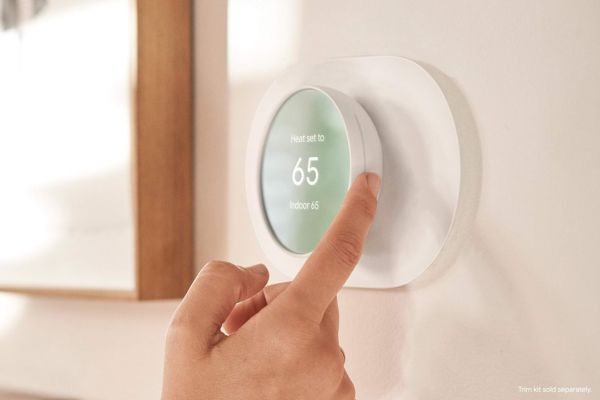
Let’s start here, because it matters more than most thermostat acknowledge.
A gorgeous, new design that retains the iconic swivel controls. The 4th Gen Nest keeps the circular form that made the original iconic — that satisfying dial you twist to adjust temperature but wraps it in a borderless 3.2-inch color touchscreen that looks completely different from anything else on the market.
The display is smart too, not just pretty. The FarSight feature means the Nest Learning Thermostat is useful even when you’re not using it to adjust temperatures from across the room you see the current temperature and a weather visualization; walk closer and it shows the day’s highs and lows, system status, and your schedule. The display adapts to your distance from it. It’s the kind of detail that feels unnecessary until you have it, and then you wonder why every thermostat doesn’t work this way.
The high contrast between the bold, illuminated text and the dark background makes it easy to read from a distance. In a room with different lighting conditions throughout the day morning light, evening lamps the display adjusts automatically so it’s always readable without being distracting.
If your thermostat sits in a visible spot in your home, this matters. If your thermostat is in a visible spot at the top of the stairs, near the front door, first thing you see it doesn’t hurt to spend a little more to have something that looks nice.
How the Learning Actually Works
The Nest Learning Thermostat’s headline feature is right there in the name it learns. But what does that actually mean day to day?
In the first week after installation, the Nest pays attention to how you interact with it. Every time you manually adjust the temperature — turning it up in the morning, down when you go to bed, lower when you leave for work the Nest notes the time, the day of the week, and what you did. After about a week of normal life, it has enough information to start running a schedule on your behalf.
The practical result is that most homeowners stop thinking about their thermostat within a few weeks of installation. The Nest handles the schedule, and manual adjustments become rare rather than routine. This is the experience the Nest was designed for and after four generations, it executes it well.
One tip worth sharing: during the first week after installation, be intentional about your temperature adjustments. The Nest learns from what you do, so if you want it to understand your actual preferences, this is the time to establish them clearly. Adjust the temperature whenever it doesn’t feel right the more data the Nest collects in week one, the better your automatic schedule will be.
The New AI Improvements
The 4th generation adds something previous Nest thermostats didn’t have: Savings Finder suggestions. Rather than just silently learning and adjusting, the Nest now proposes specific changes to your schedule “I noticed you’re usually asleep by 10:30pm. Want me to lower the temperature at 10pm?” and lets you accept or decline them.
I especially liked the smaller changes, including the ability to accept or decline suggested temperature changes to my schedule. This hybrid approach AI suggestions you consciously approve is smarter than fully automatic learning and more useful than purely manual scheduling.
The Nest also accounts for local weather in a way previous generations didn’t. On a warm sunny afternoon, it detects the solar gain through your windows and adjusts cooling proactively. On a cold night before a warm day, it plans the heating cycle ahead of time rather than reacting after the fact. The result is a home that stays consistently comfortable without running the system unnecessarily.
Matter Support Why It’s a Big Deal
One of the 4th Gen’s most important upgrades is easy to overlook in a spec list: Matter over Thread support.
Matter is the universal smart home standard backed by Google, Apple, Amazon, and Samsung. A Matter-certified thermostat works simultaneously with all of them no choosing ecosystems, no compromises. The Nest Learning Thermostat 4th Gen features Matter compatibility, which means this works with Apple Home.
Why does this matter for a thermostat? Because it means your heating and cooling system can now participate in automations across whatever smart home platform your household uses. Apple users who previously couldn’t use the Nest with HomeKit now can. Multi-platform households where one person uses Alexa and another uses Google Home can both control the thermostat from their preferred app. The choice isn’t locked in at purchase time.
This is a genuine advantage over the Ecobee SmartThermostat Premium, which as of mid still doesn’t support Matter. For buyers who care about future-proofing their smart home setup, the Nest’s Matter certification is worth noting.
Installation Mostly Easy, One Honest Caveat
Setting up the Nest Learning Thermostat is handled through the Google Home app, which walks you through the process step by step. For most US homes with standard 24-volt HVAC systems, the installation is genuinely beginner-friendly remove the old thermostat, connect the labeled wires to the Nest base, snap the thermostat on, and follow the app prompts.
Easy installation is one of the Nest’s genuine strengths even with a price increase. The physical installation is clean and straightforward, and the Google Home setup process is the most user-friendly thermostat installation we’ve encountered.
There’s one honest caveat worth knowing before you buy. The Nest uses Power Sharing technology to operate without a dedicated C-wire in most homes. This works well in most cases but some homeowners upgrading from a 3rd gen Nest in homes without a C-wire have reported that the 4th gen fails to detect sufficient power during setup, even when voltage is measurably present and the 3rd gen was working fine. It’s not a widespread problem, but it’s specific enough to be worth flagging.
Pro tip: if you are upgrading from a 3rd gen Nest and your home does not have a C-wire, run Google’s online compatibility checker before purchasing the 4th gen. Running the check takes two minutes and could save you a frustrating installation experience. The fix if needed is Google’s Nest Power Connector (inexpensive) or running a C-wire.
Living With the Nest The Day to Day Experience
After the learning period settles in, living with the Nest Learning Thermostat is genuinely pleasant in a way that’s hard to convey through spec sheets.
You stop thinking about the thermostat. That sounds trivial, but it’s actually the whole point a good smart thermostat should make itself invisible by being consistently right. The Nest earns that invisibility within a few weeks for most households.
The Home/Away detection works well. When you leave for work, the Nest shifts to an energy-saving temperature without you touching anything. When your phone’s location shows you’re on your way home, it starts conditioning ahead of your arrival so you walk into a comfortable house, not a cold or hot one.
The Google Home integration is, naturally, the deepest of any thermostat. Ask your Nest Hub to show you the thermostat status, set the temperature by voice, include the Nest in your “Good Morning” or “Leaving Home” routines all of it works fluently. For Android households already running Google Home, the Nest feels like a native extension of the system rather than a third-party addition.
The Nest app is also cleaner and less overwhelming than the Ecobee app. There’s less to configure, which is both a strength and a limitation it’s the right trade-off for buyers who want something that works without extensive setup, less ideal for buyers who want fine-grained control over every setting.
Energy Savings What to Expect
The Nest Learning Thermostat is ENERGY STAR certified and independently verified to save 10–15% on heating and cooling costs a meaningful reduction for most US households. Google’s own data across real homes shows consistent savings, with higher results in households that previously ran fixed temperatures year-round.
The learning algorithm’s biggest savings come from setback automation automatically adjusting to energy-saving temperatures when the home is empty or everyone is asleep. For households where no one was doing this manually before, the Nest delivers those savings effortlessly. For households already running disciplined schedules, the incremental savings are more modest.
One thing worth knowing: Ecobee’s claim of up to 26% savings applies to its platform, while the Nest’s independently verified range sits at 10–15%. The Ecobee’s higher figure reflects its SmartSensor system optimizing for room-level occupancy a feature the base Nest package doesn’t include (though the 4th Gen comes with one temperature sensor in the box). If maximum energy savings is your primary goal, the Ecobee has a documented edge. If ease of use and design matter as much as the savings number, the Nest is the better fit.
Check your utility’s website before buying many US utility companies offer rebates on the Nest Learning Thermostat. The savings alone typically pay back the purchase price within 12–18 months for most households.
Who Is the Nest Learning Thermostat Really For?
This is where we get honest, because the Nest isn’t the right choice for everyone.
It’s the perfect fit if you:
Use Google Home as your primary ecosystem. If you have Nest speakers, a Nest Hub on your kitchen counter, or an Android phone as your daily driver, the Nest Learning Thermostat integrates so smoothly it feels like it was always part of the system. It genuinely was — Google makes both.
Want a thermostat you don’t have to set up. The whole value proposition of the Nest is that you don’t have to build a schedule. You live normally, the Nest pays attention, and within a week it starts doing the right thing automatically. If that appeals to you if the idea of configuring a weekly heating schedule sounds like exactly what you don’t want to do the Nest is built for you.
Care about how your thermostat looks. This matters to more people than the smart home industry typically acknowledges. The Nest is genuinely beautiful, and if it’s in a visible spot in your home, it doesn’t hurt to spend a little more on something that looks nice.
Want Matter for future flexibility. The 4th Gen’s Matter support is a real advantage over Ecobee. It means you’re not locked into Google Home forever — if your household’s ecosystem changes, the thermostat goes with you.
Look elsewhere if you:
Have a multi-room home with serious temperature variation between rooms. The Ecobee’s SmartSensor system — which balances temperature across multiple rooms — is the right tool for this problem. The Nest’s single sensor reads the room it’s in; if that’s a hallway while you’re sleeping in a bedroom, it’s not the full picture.
Want the maximum verified energy savings. Ecobee’s EPA-verified 23–26% HVAC reduction beats the Nest’s 10–15%. Over several years, that gap adds up in dollar terms for high-HVAC households.
Are on a tight budget. At around $280, this is a premium product. The Ecobee Enhanced at ~$189 or the Honeywell Home T6 Pro at ~$80 deliver solid smart thermostat functionality at lower price points.
A Few Things We’d Change
The price is high
At ~$280, the Nest Learning Thermostat is significantly more expensive than competing thermostats that deliver similar and in some cases better energy savings. You’re paying partly for the brand, partly for the design, and partly for the learning experience. Those are real things worth paying for, but they’re worth naming.
No built in room sensor system
The 4th Gen includes one temperature sensor in the box, which is better than the 3rd Gen’s single point reading. But it still can’t match Ecobee’s multi-room SmartSensor system for homes with significant temperature variation across floors or rooms.
The C wire issue for specific upgraders
As noted in the installation section, some 3rd Gen Nest owners without a C-wire have hit setup problems with the 4th Gen. Google should address this more transparently. It’s not a widespread issue, but the people it affects are frustrated and they have a right to be, since the 3rd Gen worked fine in the same home.
Google only depth
The Matter support is genuinely good, but the deepest integration is still Google Home. Alexa users get functional voice control; they don’t get the seamless Google ecosystem experience. That’s expected but if Alexa is your primary platform, Ring Alarm or Ecobee may serve you better.
Frequently Asked Questions
In most homes, yes. The 4th Gen uses Power Sharing technology that draws power from existing thermostat wiring without needing a dedicated C-wire. If your setup doesn’t have sufficient power, Google’s Nest Power Connector (sold separately, inexpensive) solves the problem. If you’re upgrading from a 3rd Gen Nest without a C-wire, run Google’s compatibility check first.
Yes, thanks to Matter support in the 4th Gen. Previous generations of the Nest Learning Thermostat didn’t support HomeKit, so this is a meaningful upgrade. You can control it from the Apple Home app, include it in HomeKit automations, and use it with Siri voice commands.
Most households find the Nest has a solid schedule established within one to two weeks of normal use. The more consistently you interact with it during the first week adjusting temperature when it’s not right for you the better the learned schedule will be. After the initial period, the Nest continues refining its understanding as your routine evolves.
The Nest Thermostat (non Learning) is a more affordable option (~$130) that offers scheduling and basic automation but doesn’t learn your habits automatically. You set a schedule manually. The Nest Learning Thermostat builds its schedule from your behavior over time. The Learning model is also the one with the premium circular design the non Learning Nest has a more conventional rectangular shape.
For most people, yes, the 4th Gen is a meaningful step up. The new design is significantly better looking, Matter support is a real new capability, the FarSight display is genuinely useful, and the Savings Finder AI suggestions improve on the previous generation’s more passive approach. If your 3rd Gen is working fine, there’s no urgency. If you’re planning a thermostat upgrade anyway, the 4th Gen is worth choosing over the previous model.
Yes, basic Alexa control works: voice commands to set temperature, check the current setting, or include the thermostat in Alexa routines. The integration isn’t as deep as the native Google Home experience, but it’s functional for Alexa households. For the deepest Alexa thermostat integration, Ecobee’s built-in Alexa speaker is the stronger choice.
Our Final Verdict
The Google Nest Learning Thermostat 4th Gen is exactly what it promises to be: a beautiful, intelligent thermostat that handles your heating and cooling automatically, looks great on the wall, and fits seamlessly into the Google ecosystem.
Even with a price increase, Google’s fourth-generation Nest Learning Thermostat really impresses gorgeous design and easy installation, with the right upgrades made to make suggested changes more actionable. For most people it is worth every penny.
The key word is “most.” If you have a multi-room home with temperature problems, the Ecobee’s SmartSensor system is a better solution. If maximum energy savings percentage is your goal, the Ecobee wins on verified data. And if budget is a real constraint, there are solid thermostats at lower price points.
But if you want the hands-off learning experience, the best-looking design in the category, Matter support for future flexibility, and deep Google Home integration the Nest Learning Thermostat 4th Gen is the one to buy.