How to Set Up Smart Lighting: A Beginner’s Step-by-Step Guide
Smart lighting is one of the easiest ways to start building a smart home. With just a smart bulb, a smartphone, and a Wi-Fi connection, you can control your lights remotely, create schedules, and even use voice commands through smart assistants.
In this guide, you’ll learn how to set up smart lighting using a Wi-Fi smart bulb.
Smart Home Lighting Features to Look For
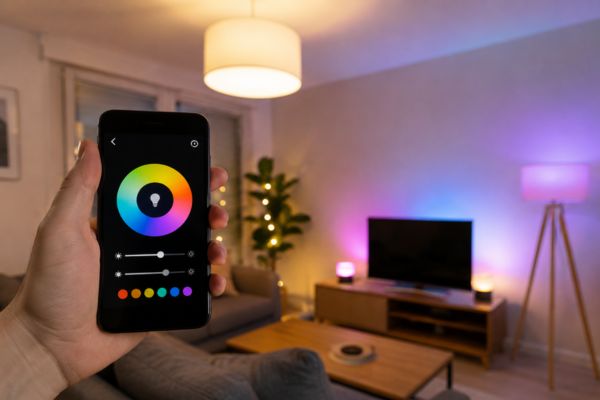
Smart lighting systems offer much more than simply turning lights on and off. Depending on the brand and model you choose, different features can help improve convenience, comfort, and energy efficiency. Before purchasing a smart lighting setup, consider the following capabilities to find the option that best fits your lifestyle.
Brightness Adjustment
One of the most popular smart lighting features is adjustable brightness. Many smart bulbs, LED strips, and recessed lights allow you to dim or brighten the room directly from an app. Some systems can even adapt the brightness throughout the day, gradually increasing illumination as daylight fades. Others provide preset lighting scenes designed for specific moods, such as relaxing in the evening or preparing for bedtime.
Color Customization
Smart lighting is not limited to standard white light. Many products allow you to choose from millions of colors as well as different shades of white, ranging from cool daylight tones to warm amber hues. The lighting can be changed instantly using a mobile app to match your mood or activity. Certain advanced systems can also sync with entertainment devices, adjusting the light colors automatically to enhance movies, TV shows, or gaming experiences.
Scheduling and Timing
Most smart lights include scheduling features that let you automate when lights turn on or off. You can create routines that fit your daily schedule or use timers to control lighting while you’re away from home. This feature not only saves energy but can also improve home security by making it appear that someone is at home even when the house is empty.
Remote Access
If your smart lighting system connects through Wi-Fi, you can control your lights from virtually anywhere with an internet connection. Whether you’re on vacation or working late, you can check your lighting status and make adjustments remotely. This flexibility ensures your home remains well-lit whenever needed, even if your plans change unexpectedly.
Voice Commands
Voice control adds another level of convenience to smart lighting. Many systems work with voice assistants, allowing you to adjust brightness, change colors, or switch lights on and off without touching your phone. A simple voice command can create the perfect atmosphere for reading, watching movies, or getting ready for sleep.
Group Lighting Control
Although each smart light can operate independently, many systems also allow you to group multiple lights together. This makes it easy to control an entire room or specific areas with a single command. For example, you can group kitchen lights to operate simultaneously or create separate lighting zones within a larger living space.
Benefits of Smart Light Bulbs
Energy Efficiency
Smart bulbs use LED technology, which consumes significantly less energy than traditional incandescent bulbs. Upgrading from older lighting can result in immediate energy savings. In addition, features such as dimming and automatic schedules help reduce electricity consumption even further. When combined with motion sensors, lights can automatically turn off when rooms are unoccupied, preventing unnecessary energy use.
Better Sleep and Well-Being
Lighting can have a direct impact on your body’s natural sleep cycle. Some smart lighting systems are designed to support healthier routines by changing color temperature throughout the day. In the evening, the lights gradually shift to warmer tones that are gentler on the eyes and may help promote a more restful night’s sleep.
Long Lifespan
LED smart bulbs are built to last for many years. Most models provide between 15,000 and 25,000 hours of use, which can translate into more than a decade of reliable performance depending on daily usage. Compared to traditional incandescent bulbs, smart LEDs require far fewer replacements, reducing both maintenance and long-term costs.
Enhanced Home Security
Smart lighting can contribute to a safer home environment. Outdoor smart lights often include features such as motion detection and security cameras, sending alerts directly to your smartphone when movement is detected. Indoors, automated lighting schedules can create the appearance of occupancy, helping discourage unwanted visitors when you’re away.
Everyday Convenience
One of the biggest advantages of smart lighting is convenience. Whether you use a smartphone app or voice assistant, you can control your home’s lighting without leaving your seat. Adjust brightness, switch lights off, or create customized scenes instantly, making everyday life simpler and more comfortable.
What You Need Before Getting Started
Before installation, make sure you have:
- A smart Wi-Fi bulb
- A smartphone
- The smart bulb app installed
- A 2.4 GHz Wi-Fi network
- A working light socket
How to install smart home lighting
- Download the Wyze app.

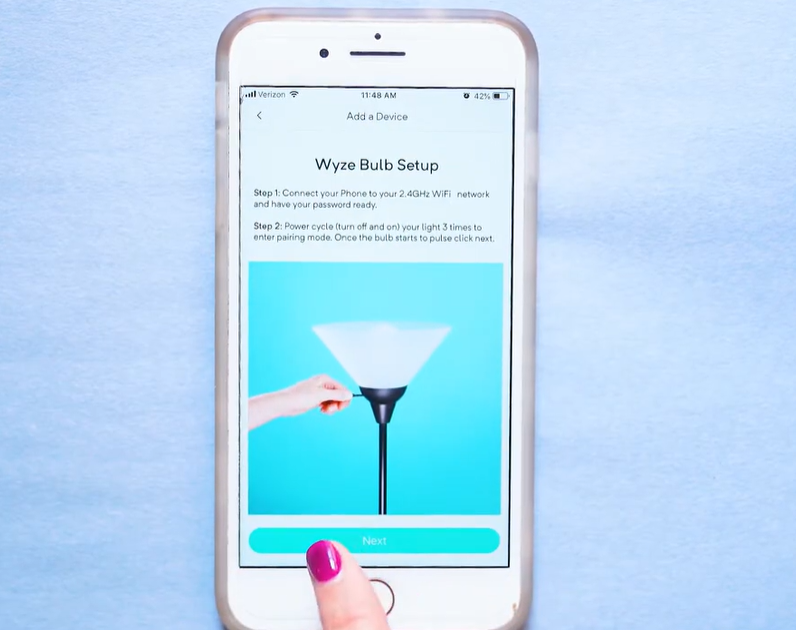
- Create an account.
- Select New Device in the center of the home screen.

- Select Wyze Bulb from the list of devices.

- Make sure your phone is connected to a 2.4 GHz network.
- Screw in the bulb.

- Turn the power on and off three times.
- Wait for the bulb to flash. The bulb is now in pairing mode.
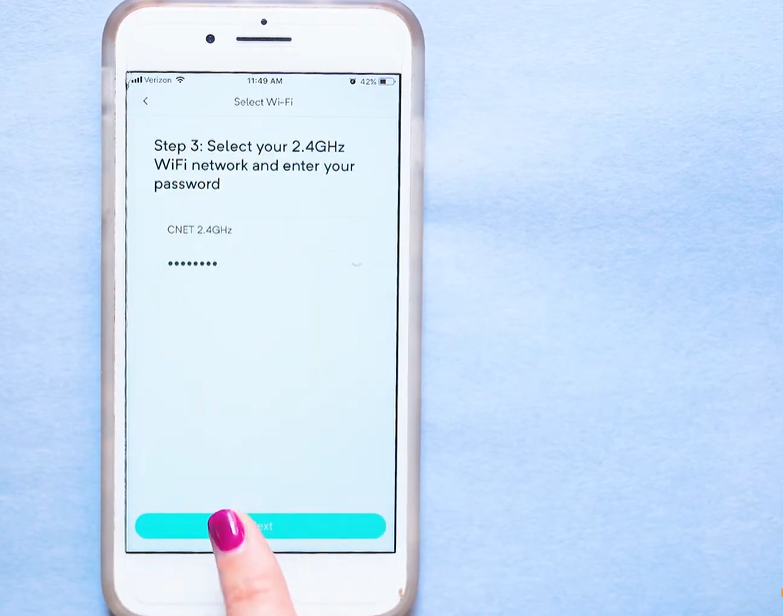
- Enter your Wi-Fi name and password.
- Connect to the Wyze Smart Bulb Wi-Fi network in your phone settings.
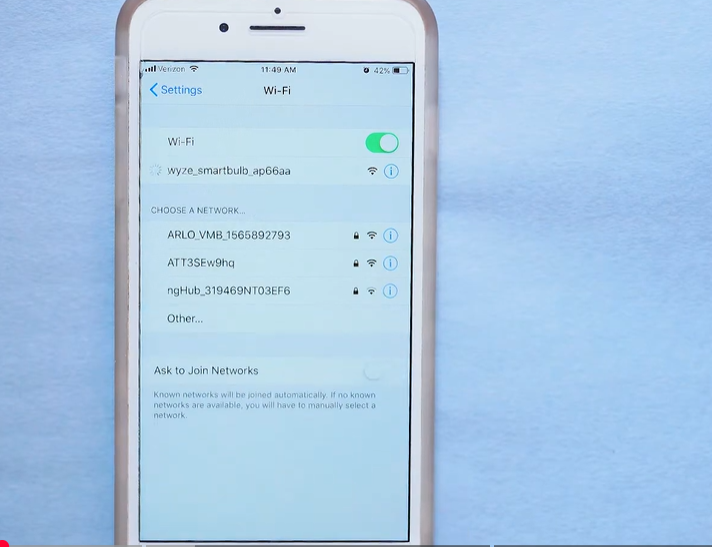
- Return to the app, and the bulb will connect automatically.
- Create a unique name for the light.

- Set up custom on/off schedules and more.
How Much Does Smart Lighting Cost?
The price of a smart lighting system can vary widely based on several factors, including the type of lighting, the manufacturer, and the features offered. Basic smart bulbs are generally more affordable, while advanced systems with color-changing capabilities, voice control, and automation features tend to cost more. The overall size of your setup also affects the budget. If you plan to upgrade every light in your home, larger properties will naturally require a greater investment.
Another expense to consider is a smart hub. While many modern smart lights connect directly to Wi-Fi, some systems use a dedicated hub to manage multiple devices and create a centralized smart home network. If you want all your lighting and other smart devices to work seamlessly together, investing in a hub may be worthwhile.
The good news is that many smart lighting products are designed with easy installation in mind, helping homeowners save on installation costs. Smart bulbs can usually be installed just like traditional light bulbs simply screw them into the socket and complete the setup through a mobile app. Similarly, smart LED strip lights are often equipped with adhesive backing, allowing them to be attached to surfaces quickly and plugged into a standard power outlet without professional assistance.