
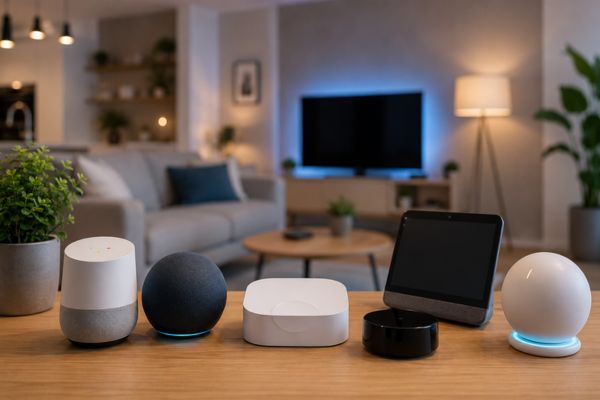

As smart homes become more popular, many homeowners find themselves managing devices from multiple brands and apps. Smart lights, locks, cameras, speakers, and thermostats often operate independently, making automation more complicated than it should be.
This is where a smart home hub comes in. A hub acts as the central command center for your connected devices, allowing them to communicate with each other and work together seamlessly.
In this guide, we’ll explain what a smart home hub is, how it works, its benefits, and whether you need one for your smart home setup.
What Is a Smart Home Hub?
A smart home hub is a device or software platform that connects and manages multiple smart devices from different manufacturers. Instead of controlling each device separately, the hub serves as a central point where all connected devices communicate.
Think of a smart home hub as the “brain” of your smart home. It coordinates actions between devices and enables advanced automation that may not be possible through individual apps alone.
For example, a smart home hub can:
- Turn on lights when you unlock the front door.
- Adjust the thermostat when everyone leaves the house.
- Activate security cameras at night.
- Close smart blinds during hot afternoons.
- Trigger multiple actions with a single voice command.
How Does a Smart Home Hub Work?
Smart home hubs connect devices using various communication protocols and technologies.
Wi-Fi
Many smart devices connect directly through Wi-Fi networks. Wi-Fi devices typically communicate through cloud services and mobile apps.
Benefits include:
- Easy setup
- Wide compatibility
- No additional bridges required
However, Wi-Fi devices can sometimes place extra load on your home network.
Zigbee
Zigbee is a low-power wireless protocol designed specifically for smart home devices.
Advantages include:
- Energy efficiency
- Reliable communication
- Mesh networking capabilities
- Extended device battery life
Many sensors, smart plugs, and smart lighting products use Zigbee technology.
Z-Wave
Z-Wave is another wireless protocol built for home automation.
Key benefits:
- Strong reliability
- Reduced interference
- Secure communication
- Excellent automation support
Z-Wave devices often require a compatible hub for operation.
Matter
This is newer smart home standard created to improve compatibility between devices from different brands.
Matter aims to:
- Simplify setup
- Improve interoperability
- Reduce ecosystem limitations
- Enhance local device control
Many new smart home products now include Matter support.
Why Use a Smart Home Hub?
Centralized Device Management
Without a hub, you may need multiple apps to control various devices. A hub consolidates control into one platform, making management simpler and more convenient.
Better Automation
A hub allows devices from different brands to work together.
For example:
- Motion sensor detects movement.
- Hallway lights turn on.
- Security camera begins recording.
- Smart speaker announces activity.
All of these actions can occur automatically through one automation rule.
Improved Reliability
Many hubs process commands locally rather than relying entirely on cloud services. This can improve response times and reduce disruptions during internet outages.
Enhanced Security
Local processing can reduce dependence on external servers and improve privacy for sensitive smart home functions.
Scalability
As your smart home grows, a hub makes it easier to manage dozens or even hundreds of connected devices from one interface.
Types of Smart Home Hubs
Dedicated Hardware Hubs
These are physical devices designed specifically for home automation.
Examples include:
- Samsung SmartThings Hub
- Hubitat Elevation
- Home Assistant Green
They support multiple communication protocols and advanced automation options.
Smart Speakers with Hub Functions
Some smart speakers include built-in hub capabilities.
Examples include:
- Amazon Echo devices with Zigbee support
- Google Nest Hub models
- Apple HomePod for HomeKit ecosystems
These provide voice control and smart home management in one device.
Software-Based Hubs
Software platforms can run on dedicated hardware, mini PCs, or servers.
Popular examples:
- Home Assistant
- OpenHAB
- Node-RED integrations
These solutions offer extensive customization for advanced users.
Features to Look for in a Smart Home Hub
When choosing a smart home hub, consider the following features:
Device Compatibility
Ensure the hub supports your existing and future smart devices.
Matter Support
Matter compatibility helps future-proof your smart home investments.
Local Automation
Local processing often results in faster performance and improved reliability.
Voice Assistant Integration
Look for support with:
- Amazon Alexa
- Google Assistant
- Apple Siri
Mobile App Quality
A user-friendly app makes daily control and automation management easier.
Security Features
Choose hubs that offer:
- Encryption
- Two-factor authentication
- Frequent firmware updates
Do You Really Need a Smart Home Hub?
Not everyone requires a dedicated hub.
You may not need one if:
- You only own a few smart devices.
- All devices belong to the same ecosystem.
- Basic voice control meets your needs.
However, a hub becomes increasingly valuable if:
- You use devices from multiple brands.
- You want advanced automation.
- You plan to expand your smart home.
- You prefer local control and enhanced reliability.
For many homeowners, a smart home hub quickly becomes the foundation of a more efficient and intelligent home.
Common Smart Home Hub Use Cases
Energy Management
Automate thermostats, smart plugs, and lighting to reduce energy consumption.
Home Security
Integrate cameras, locks, sensors, and alarms into one coordinated security system.
Morning Routines
Automatically:
- Open blinds
- Turn on lights
- Start coffee makers
- Read weather updates
Away Mode
When nobody is home, the hub can:
- Lock doors
- Arm security systems
- Turn off unnecessary lights
- Lower heating or cooling usage
The Future of Smart Home Hubs
The smart home industry is moving toward greater interoperability through Matter and Thread technologies. Future hubs will likely become even more powerful while requiring less setup and maintenance.
As artificial intelligence continues to improve, smart home hubs will become more proactive, learning household habits and automatically optimizing comfort, security, and energy efficiency.
Homeowners can expect faster device communication, broader compatibility, and smarter automation experiences in the years ahead.
Frequently Asked Questions
What does a smart home hub do?
A smart home hub connects and manages multiple smart devices from different manufacturers, allowing centralized control and automation.
Can I use smart devices without a hub?
Yes. Many smart devices connect directly to Wi-Fi and can be controlled through their own apps. However, a hub often provides better automation and integration.
What is the difference between a hub and a smart speaker?
A smart speaker primarily provides voice control, while a smart home hub focuses on device communication and automation. Some devices combine both functions.
Is Matter replacing smart home hubs?
No. Matter improves compatibility between devices, but hubs still play an important role in automation, local control, and advanced smart home management.
Which smart home hub is best for beginners?
Platforms such as SmartThings and Amazon Echo devices with built-in hub functionality are often considered beginner-friendly due to their easy setup and broad compatibility.
Conclusion
Understanding smart home hubs is essential for anyone looking to build a connected and automated home. By serving as the central control point for smart devices, hubs simplify management, improve automation, and create a more seamless smart home experience.
Whether you’re just starting your smart home journey or expanding an existing setup, choosing the right hub can help unlock the full potential of your connected devices and prepare your home for the future of smart living.