
Nest Cam Review: Is Google’s Smart Camera Worth Buying?
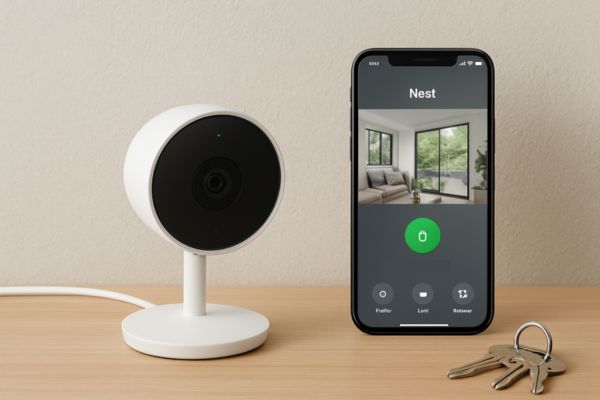
Smart security cameras are no longer just for large houses or tech enthusiasts. Today, many apartment dwellers, families, and even renters are considering devices like Nest Cam to improve everyday security. But with subscriptions, AI features, and strong competitors like Ring, the big question remains: is Nest Cam worth it in 2026? and how about Nest Cam review?
This Nest Cam review takes a practical, real-world look at Google’s smart camera lineup covering features, costs, pros and cons, and who it actually makes sense for.
Quick Verdict
Nest Cam is a strong choice if you’re already invested in Google’s smart home ecosystem and value smart alerts over raw hardware specs. However, it’s not the cheapest option, and its best features depend on a paid subscription.
Who should buy Nest Cam
- Users already using Google Home, Nest Hub, or Google Assistant
- Apartment or home owners who want reliable AI alerts, not just motion detection
- Families who prefer a simple, clean app experience
- Users who care about privacy controls from a well known brand
Who should skip it
- Buyers who want local storage without subscriptions
- Those looking for the lowest upfront cost
- Smart home users deeply invested in Amazon Alexa / Ring ecosystem
What Is Nest Cam?
Nest Cam is Google’s line of smart security cameras designed for indoor and outdoor monitoring. It focuses on AI powered detection, cloud based video history, and seamless integration with the Google Home ecosystem.
Rather than overwhelming users with technical controls, Nest Cam emphasizes simplicity making it attractive for non-technical users who still want advanced features.
Nest Cam Models Explained
Google currently offers several Nest Cam options to fit different use cases.
Nest Cam (Indoor, Wired)
Best for:
- Apartments
- Baby rooms
- Entryways and living rooms
This model requires constant power but offers reliable performance and continuous monitoring.
Nest Cam (Battery)
Best for:
- Renters
- Outdoor areas without wiring
- Flexible placement
It can be used indoors or outdoors and switches to battery mode during power outages.
Nest Cam with Floodlight
Best for:
- Driveways
- Backyards
- High visibility outdoor security
This model combines a camera with bright floodlights, adding deterrence alongside monitoring.
Key Features of Nest Cam
Video Quality & Night Vision
Nest Cam delivers clear 1080p HD video, which is more than sufficient for identifying faces and activities. Night vision uses infrared LEDs and performs well for home surveillance, though it’s not aimed at cinematic-quality footage.
Smart Alerts & AI Detection
One of Nest Cam’s biggest strengths is intelligent alerts:
- Person detection
- Package detection
- Vehicle detection (model-dependent)
Instead of constant motion notifications, alerts feel more relevant especially useful in busy urban areas.
Two Way Audio & Talkback
The built in microphone and speaker allow real-time communication. This is useful for:
- Talking to delivery drivers
- Warning off suspicious visitors
- Checking in on family members
Audio quality is clear enough for everyday use.
Google Home Integration
Nest Cam works seamlessly inside the Google Home app, allowing:
- Live viewing on Nest Hub displays
- Voice commands via Google Assistant
- Unified control with other Google smart devices
If your home already runs on Google, this integration feels natural.
Nest Aware Subscription: Is It Required?
This is where many buyers hesitate.
Free vs Paid Features
Without Nest Aware, you still get:
- Live video streaming
- Motion alerts
- Limited event snapshots
However, video history and advanced AI alerts require a subscription.
Monthly & Yearly Pricing
Nest Aware is available as:
- Monthly plans
- Discounted yearly plans
Pricing is competitive with other major brands, but it’s still an ongoing cost something to factor into long term value.
Nest Cam Pros & Cons
Pros
- Clean, beginner friendly app
- Excellent AI based alerts
- Strong Google Home integration
- Reliable brand reputation
- Thoughtful privacy controls
Cons
- Subscription needed for full functionality
- No local storage option
- Limited customization compared to some competitors
- Not ideal for Alexa only households
Nest Cam vs Other Smart Cameras
Compared to other brands, Nest Cam prioritizes smart detection and ecosystem integration rather than hardware flexibility.
- Versus Ring: Nest Cam offers better AI alerts, while Ring excels in Alexa integration.
- Versus budget cameras: Nest Cam feels more polished but costs more over time.
For a broader comparison, see Best Smart Cameras for Home Security 2025 to understand where Nest Cam fits in the bigger picture.
Installation & Ease of Use
Setup is one of Nest Cam’s strongest points.
- Guided installation via Google Home app
- Minimal technical steps
- Battery models mount easily without drilling
Even first-time users can get up and running in minutes.
Privacy & Data Security
Google includes several privacy-focused features:
- Camera status lights
- Physical camera orientation control
- Activity zones
- Data encryption
While cloud storage always carries some risk, Nest Cam gives users clear visibility into when and how the camera is recording. For deeper insights, see Smart Home Privacy Tips: Protecting Your Data.
Is Nest Cam Worth It in 2025?
Nest Cam is worth it if you value smart alerts, ease of use, and Google ecosystem compatibility more than avoiding subscriptions.
It shines in:
- Apartments and family homes
- Users who want fewer false alerts
- Smart homes built around Google Assistant
However, power users or privacy first buyers may want to explore alternatives listed in How to Choose the Right Smart Security Camera.
FAQ
Final Verdict
Nest Cam is a polished, reliable smart camera that prioritizes intelligence over complexity. It’s not the cheapest option, but for Google users who want dependable security without hassle, it delivers solid value in 2026.
👉 Ready to compare Nest Cam with other top options?
Check out Best Smart Cameras for Home Security 2026 to find the best fit for your home.